

You cannot create or edit Stripe products in PriceOS. Instead, you manage them in Stripe and then PriceOS will automatically import and sync the changes.
How it works
- You create and manage Stripe products and prices in Stripe
- PriceOS automatically imports and syncs products, prices, subscriptions, and customers from Stripe
- You define feature access for your Stripe products in PriceOS
Linking Stripe prices to Stripe products
By default, all Stripe prices will be automatically linked to their corresponding product. That means that any customers who have a subscription with any of those Stripe prices will receive the feature access you define for the product. You can see which prices are linked in the product details page.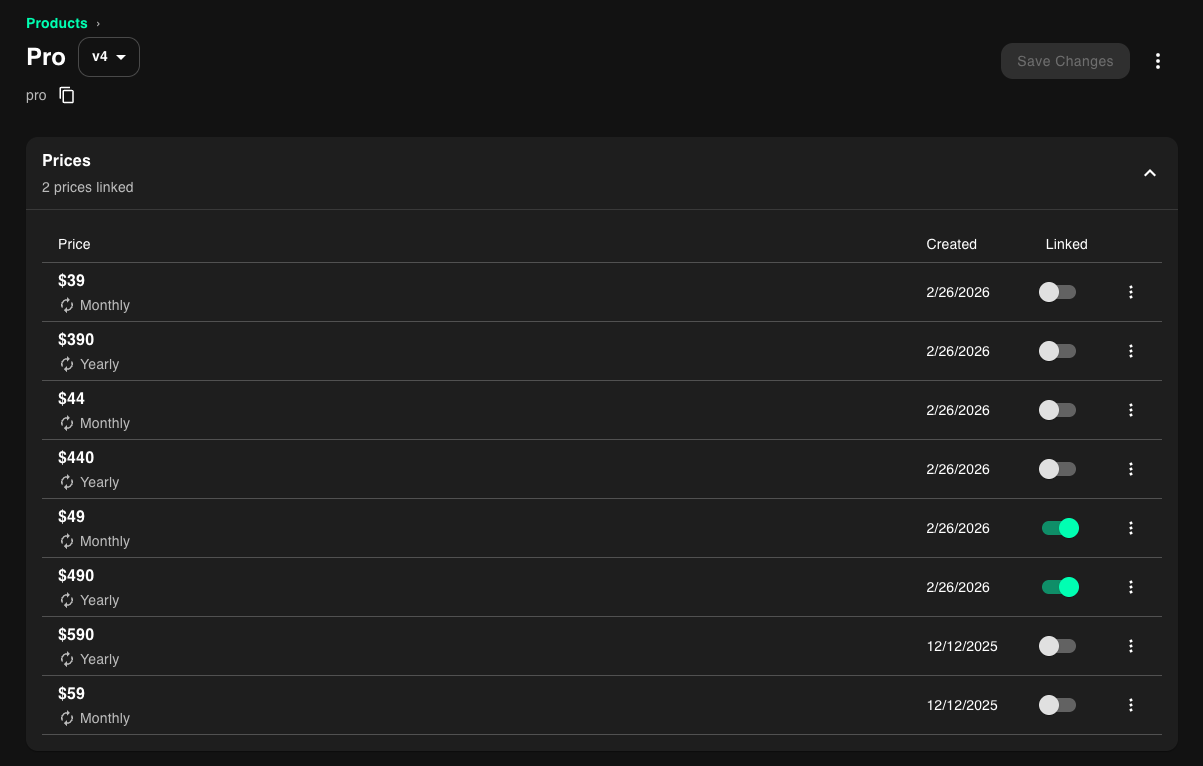
Hiding Stripe products
By default, we import all of your Stripe products, but often, not every Stripe product needs feature access.Hiding a product in PriceOS does not change anything in your Stripe account.
Hiding a single Stripe product
- Go to the products page
- Click the More menu (…) next to the product you want to hide
- Click the Hide from PriceOS menu option
Hiding multiple Stripe products
You can also use our bulk select to hide multiple Stripe products at once- Go to the products page
- Click the More menu (…) at the top right of the page
- Click the Bulk select option
- Select which products you want to hide
- Click the Hide from PriceOS option