> ## Documentation Index
> Fetch the complete documentation index at: https://docs.priceos.com/llms.txt
> Use this file to discover all available pages before exploring further.
# Product Versioning
> Product versioning lets you change your pricing and/or feature access definitions without affecting existing customers.
Product versioning is useful if you want to...
* Update your pricing on the same product
* Update which products have access to which features
* Change limits
* Run pricing experiments
...all without affecting existing customers.
You can create multiple product versions for [Stripe products](/stripe-products) and [custom products](/custom-products), but not [default custom products](/custom-products#default-custom-products).
***
## Creating a new product version
Anytime you update a product's feature access and/or [linked Stripe prices](/stripe-products#linking-stripe-prices-to-stripe-products), you'll be asked if you want to create a new product version.
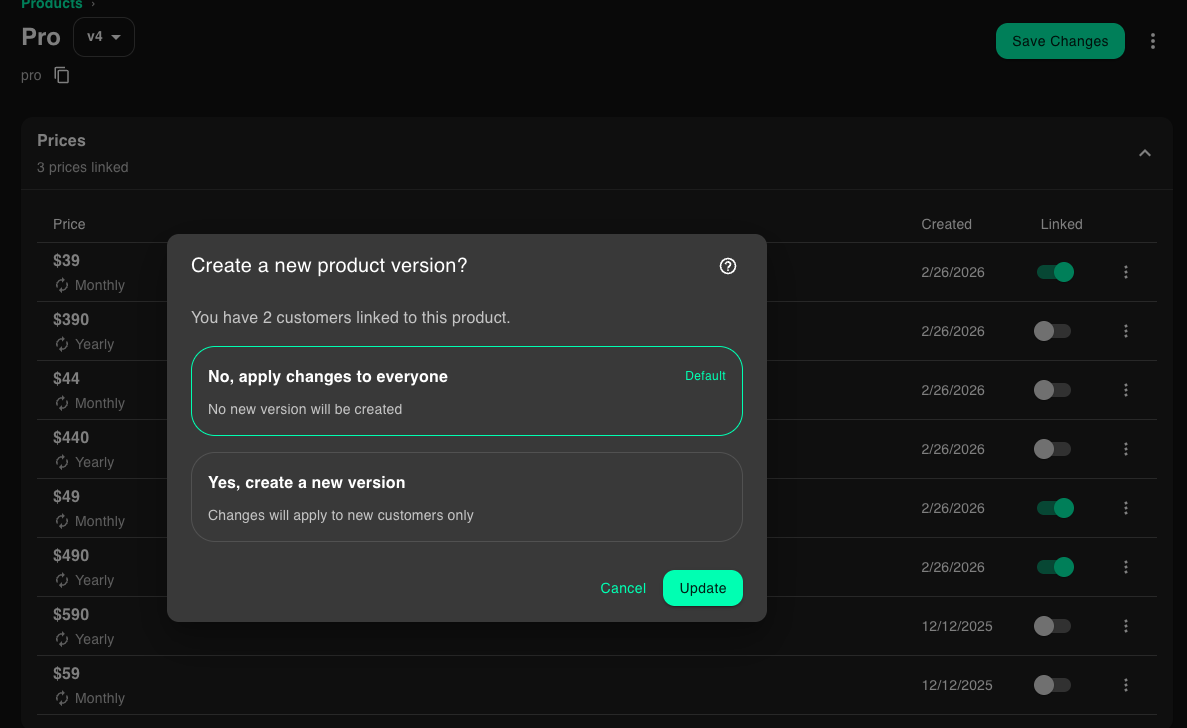 If you want your changes to apply immediately to all customers, then you do not need to create another product version.
However, if you want your changes only to apply to new customers, then you'll need to create another product version.
You'll only be asked to create a new product version if the product has customers attached to it AND you have integrated PriceOS into your application.
### Create a new version manually
Sometimes you'll want to create a new product version even if no customers are attached or you have not integrated the API yet.
In that case, you can just click the More menu (...) at the top-right of the product details page and click the New version option.
If you want your changes to apply immediately to all customers, then you do not need to create another product version.
However, if you want your changes only to apply to new customers, then you'll need to create another product version.
You'll only be asked to create a new product version if the product has customers attached to it AND you have integrated PriceOS into your application.
### Create a new version manually
Sometimes you'll want to create a new product version even if no customers are attached or you have not integrated the API yet.
In that case, you can just click the More menu (...) at the top-right of the product details page and click the New version option.