> ## Documentation Index
> Fetch the complete documentation index at: https://docs.priceos.com/llms.txt
> Use this file to discover all available pages before exploring further.
# Managing Bonuses
> Manage bonuses via the PriceOS web app or our API
## List bonuses
```ts TypeScript theme={null}
const { bonuses } = await priceos.bonuses.list({
customerId: "customer_123",
featureKey: "api_calls",
});
```
```bash cURL theme={null}
curl -X GET "https://api.priceos.com/v1/bonuses?customerId=customer_123&featureKey=api_calls" \
-H "x-api-key: PRICEOS_API_KEY"
```
For more details, see [List bonuses](/api-reference/endpoint/bonuses-list).
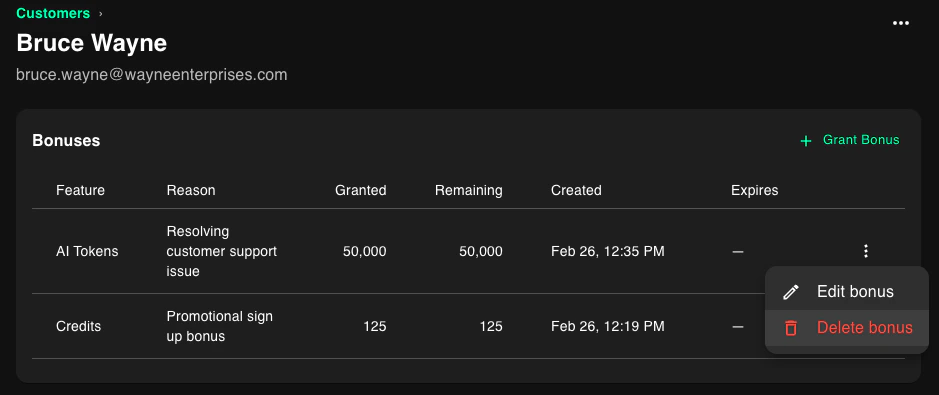
You can view a customer's bonuses in the customer deteails page.
 ***
## Update a bonus
```ts TypeScript theme={null}
const result = await priceos.bonuses.update({
bonusId: "9e9be7e5-55d2-4b44-93af-c3687f4b8af5",
amount: 150,
expiresAt: null, // clear expiration
reason: "manual_adjustment",
});
```
```bash cURL theme={null}
curl -X PUT "https://api.priceos.com/v1/bonuses/9e9be7e5-55d2-4b44-93af-c3687f4b8af5" \
-H "x-api-key: PRICEOS_API_KEY" \
-H "Content-Type: application/json" \
-d '{
"amount": 150,
"expiresAt": null,
"reason": "manual_adjustment"
}'
```
For more details, see [Update bonus](/api-reference/endpoint/bonuses-update).
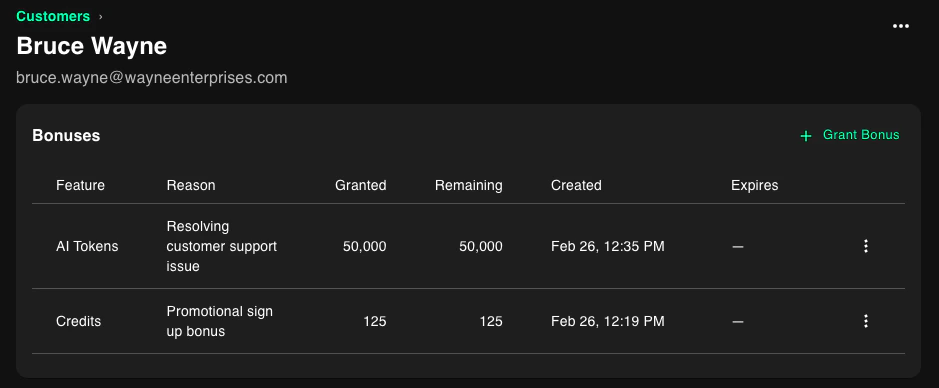
You can update a customer's bonus in the customer deteails page by clicking the More menu (...) next to the bonus.
***
## Update a bonus
```ts TypeScript theme={null}
const result = await priceos.bonuses.update({
bonusId: "9e9be7e5-55d2-4b44-93af-c3687f4b8af5",
amount: 150,
expiresAt: null, // clear expiration
reason: "manual_adjustment",
});
```
```bash cURL theme={null}
curl -X PUT "https://api.priceos.com/v1/bonuses/9e9be7e5-55d2-4b44-93af-c3687f4b8af5" \
-H "x-api-key: PRICEOS_API_KEY" \
-H "Content-Type: application/json" \
-d '{
"amount": 150,
"expiresAt": null,
"reason": "manual_adjustment"
}'
```
For more details, see [Update bonus](/api-reference/endpoint/bonuses-update).
You can update a customer's bonus in the customer deteails page by clicking the More menu (...) next to the bonus.
 ***
## Delete a bonus
Delete removes a bonus grant that has not been consumed.
```ts TypeScript theme={null}
const result = await priceos.bonuses.delete("9e9be7e5-55d2-4b44-93af-c3687f4b8af5");
```
```bash cURL theme={null}
curl -X DELETE "https://api.priceos.com/v1/bonuses/9e9be7e5-55d2-4b44-93af-c3687f4b8af5" \
-H "x-api-key: PRICEOS_API_KEY"
```
For more details, see [Delete bonus](/api-reference/endpoint/bonuses-delete).
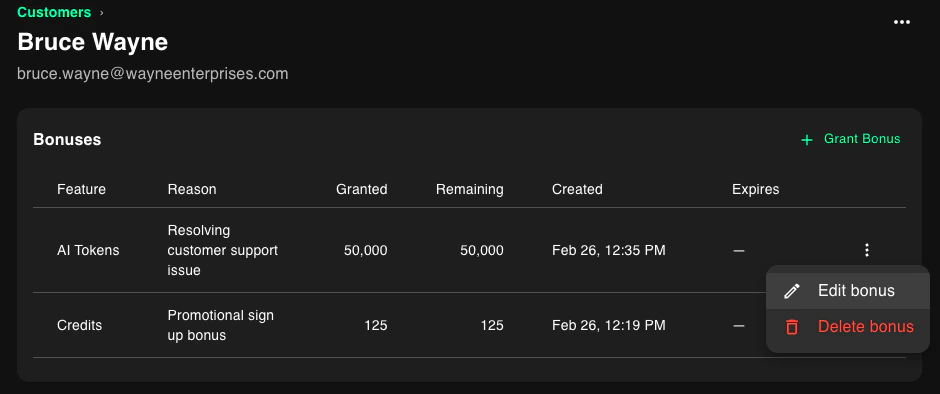
You can delete a customer's bonus in the customer deteails page by clicking the More menu (...) next to the bonus.
***
## Delete a bonus
Delete removes a bonus grant that has not been consumed.
```ts TypeScript theme={null}
const result = await priceos.bonuses.delete("9e9be7e5-55d2-4b44-93af-c3687f4b8af5");
```
```bash cURL theme={null}
curl -X DELETE "https://api.priceos.com/v1/bonuses/9e9be7e5-55d2-4b44-93af-c3687f4b8af5" \
-H "x-api-key: PRICEOS_API_KEY"
```
For more details, see [Delete bonus](/api-reference/endpoint/bonuses-delete).
You can delete a customer's bonus in the customer deteails page by clicking the More menu (...) next to the bonus.