> ## Documentation Index
> Fetch the complete documentation index at: https://docs.priceos.com/llms.txt
> Use this file to discover all available pages before exploring further.
# Linking Stripe Customers
> PriceOS needs a way to map Stripe customers to your own internal ID
There are two ways to link a Stripe customer to your own internal user/customer ID:
* [Stripe metadata (recommended)](#stripe-metadata-recommended)
* [Manually via API](#manually-via-api)
## Stripe metadata (recommended)
The easiest way to link a Stripe customer with your own internal ID is to add it to a [Stripe customer's metadata](https://docs.stripe.com/api/metadata).
This can be done when creating a Checkout Session using Stripe's API.
If you use PriceOS's [checkout](/api-reference/endpoint/customer-checkout) or [customer portal](/api-reference/endpoint/customer-portal) endpoint, this will be done automatically for you.
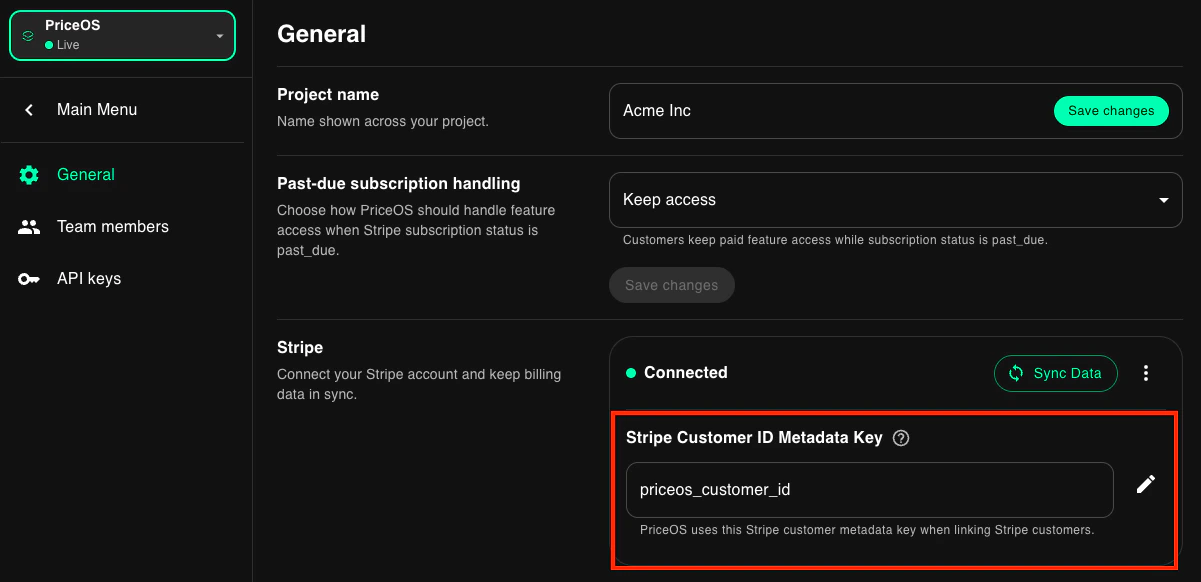
By default, if you name the metadata field `priceos_customer_id` it will automatically be linked by PriceOS.
If you already have a metadata field for your internal customer ID or just want to use another name, you can specify it in your [Settings](https://app.priceos.com/settings/general).
 ## Manually via API
You can also link Stripe customers to your internal customer ID using the `link` endpoint.
```ts TypeScript theme={null}
const customer = await priceos.customers.link({
stripeCustomerId: "cus_123", // Stripe customer ID
customerId: "customer_123", // Your internal customer ID
});
```
```bash cURL theme={null}
curl -X POST "https://api.priceos.com/v1/customers/link" \
-H "x-api-key: PRICEOS_API_KEY" \
-H "Content-Type: application/json" \
-d '{
"customerId": "customer_123",
"stripeCustomerId": "cus_123"
}'
```
This only needs to be done once per customer. Do it when the Stripe customer is created.
This is safe to run even before the customer is created in our system.
### CSV upload
If you want to link many existing customers at once, use bulk CSV upload in the Customers section of the dashboard.
## Manually via API
You can also link Stripe customers to your internal customer ID using the `link` endpoint.
```ts TypeScript theme={null}
const customer = await priceos.customers.link({
stripeCustomerId: "cus_123", // Stripe customer ID
customerId: "customer_123", // Your internal customer ID
});
```
```bash cURL theme={null}
curl -X POST "https://api.priceos.com/v1/customers/link" \
-H "x-api-key: PRICEOS_API_KEY" \
-H "Content-Type: application/json" \
-d '{
"customerId": "customer_123",
"stripeCustomerId": "cus_123"
}'
```
This only needs to be done once per customer. Do it when the Stripe customer is created.
This is safe to run even before the customer is created in our system.
### CSV upload
If you want to link many existing customers at once, use bulk CSV upload in the Customers section of the dashboard.