> ## Documentation Index
> Fetch the complete documentation index at: https://docs.priceos.com/llms.txt
> Use this file to discover all available pages before exploring further.
# Custom Products
> Custom products let you define feature access for customers that don’t exist in Stripe.
Custom products are useful for things like...
* Freemium plans
* Free trials
* Lifetime deals
* Internal users or test accounts
* Enterprise contracts handled off-Stripe
Unlike [Stripe products](/stripe-products), custom products are assigned to customers manually using our API.
***
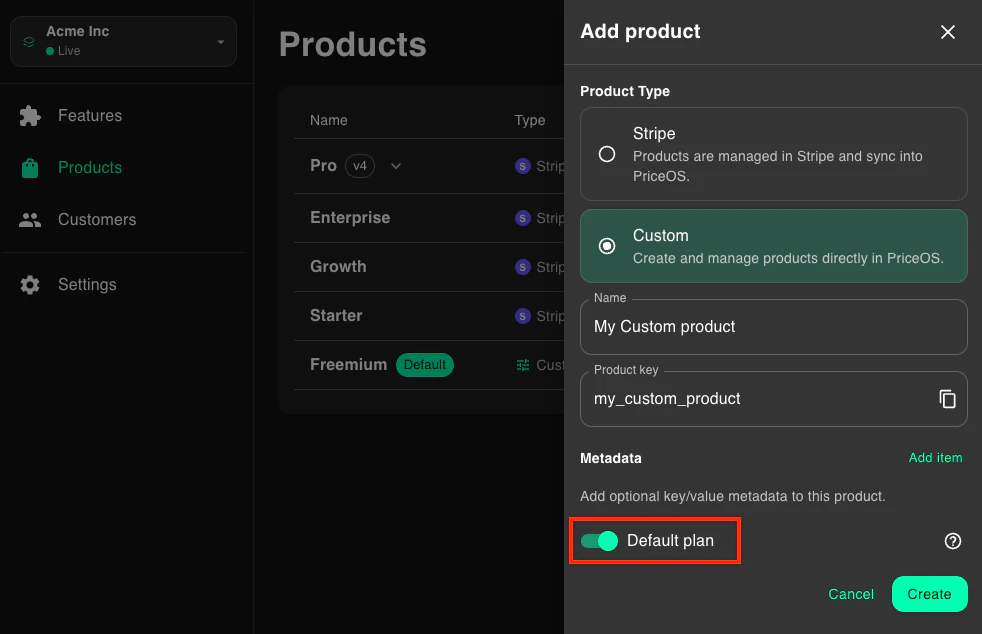
## How to create a custom product
1. Go to the [products page](https://app.priceos.com/products)
2. Click the New Product button
3. Enter a name for the product
4. Click the Create button
You will then be taken to the product details page where you can [define feature access](/defining-feature-access) for your product.
***
## How to assign custom products to customers
You can assign products when you create a custom or anytime after.
```ts TypeScript theme={null}
const customer = await priceos.customers.create({
customerId: "customer_123",
customProductKeys: ["custom_basic"],
});
```
```bash cURL theme={null}
curl -X POST "https://api.priceos.com/v1/customers" \
-H "x-api-key: PRICEOS_API_KEY" \
-H "Content-Type: application/json" \
-d '{
"customerId": "customer_123",
"customProductKeys": ["custom_basic"]
}'
```
```ts TypeScript theme={null}
const customer = await priceos.customers.update({
customerId: "customer_123",
customProductKeys: ["custom_basic"],
});
```
```bash cURL theme={null}
curl -X PUT "https://api.priceos.com/v1/customers/customer_123" \
-H "x-api-key: PRICEOS_API_KEY" \
-H "Content-Type: application/json" \
-d '{
"customProductKeys": ["custom_basic"]
}'
```
For more details, see [Create Customer](/api-reference/endpoint/create) and [Update Customer](/api-reference/endpoint/update).
If you have [limit features](/creating-features#limit-features) that reset periodically based on billing period, you can set the [`usageStartedAt`](/api-reference/endpoint/create#body-usage-started-at) field to specify the reset anchor.
If not specified, we'll use the date the customer was created.
***
## Removing custom products from customers
To remove custom products from customers, just update the customer with whatever custom product keys the customer should have.
```ts TypeScript theme={null}
const customer = await priceos.customers.update({
customerId: "customer_123",
customProductKeys: [],
});
```
```bash cURL theme={null}
curl -X PUT "https://api.priceos.com/v1/customers/customer_123" \
-H "x-api-key: PRICEOS_API_KEY" \
-H "Content-Type: application/json" \
-d '{
"customProductKeys": []
}'
```
For more details, see [Update Customer](/api-reference/endpoint/update).
***
## Default custom products
Default custom products let you define feature access for everyone else who doesn't have a product, which can be useful for things like freemium plans.
### How default custom products work
There are some important points to understand about default custom products...
* You can only have one default product
* Default products get automatically applied to any customers not assigned a product
* Default products cannot be manually assigned
* Default products cannot have multiple versions
If a customer has either Stripe-derived products or assigned custom products, the default product is not used.
### Creating a default product
You can set any custom product as the default product by clicking the default switch when creating or editing a custom product.